
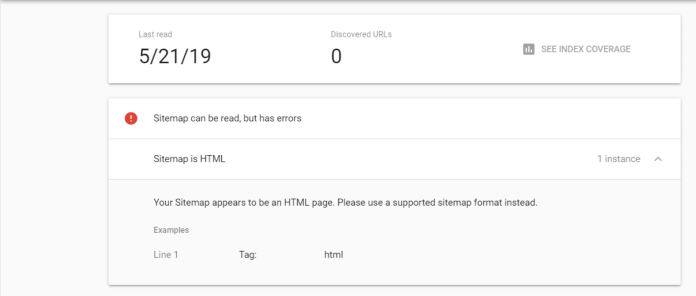
Sitemap HTML Error is one issue every site owner might experience in a long run after some wrong configuration must have taken place.
The HTML Error comes on when you try to submit your sitemap to Google search console and some other search engines.
It might look right to you but the configuration is wrong. On this same blog we experienced similar issue and we were able to resolve it after too many debugging. We arrived with the solution listed below.
Implications relating to not resolving this issue
These issues can lead to serious loss of traffic, because search engines won’t be able to read your sitemap, index your page, posts and the entire site.
What Causes this Error and How To Resolve?
1. Wrong Sitemap Format
Check if the sitemap url is in this format. example.com/sitemap.xml or example.com/sitemap_index.xml
How to resolve wrong Sitemap Format
If sitemap is not in any of those formats, install plugins like yoast, Rank Maths, AIOSEO, etc to use their sitemap or install a sitemap generator plugin. We recommend “XML Sitemap Generator for Google by Auctollo)” if you’re using a plugin to generate sitemap instead of using an SEO plugin.
2. Wrong Sitemap configuration:
When a sitemap is not configured properly, issues such as this might come on.
How to Resolve Wrong Sitemap configuration
- Use any of the popular wordpress plugin such as Rank Maths, Yoast, etc to generate sitemap and stick to the SEO plugin you chose.
- Rset link: On your wordpress dashboard, visit settings – Permalink and click on save without changing anything.
- Resubmit sitemap to Search console.
This should resolve the issue, but if it doesn’t, check out for caching issues.
3. Wrong Caching Configuration
This is another issue that can lead your sitemap to a HTML Sitemap Error. Wrong configuration in your caching application.
Some popular plugins that can cause this issue:
- Litespeed Cache
- WP Optimize
- WP Fastest Cache
- WP Super Cache
- W3 Total Cache
- WP Rocket
- Others
If you’re using the aforementioned plugins, please do not do the following:
- Do not turn ON Guest Mode and Guest Optimization: If you’ve turned on any of this options, kindly turn it off.
- Do not turn on sitemap crawler or submit your sitemap to any of the caching plugin.
Read Also: How To Easily Win Money On Football Betting
How To Resolve Cache Plugin Crawler issues
This is what to do if you’ve already submitted your sitemap to a crawler plugin.
- Turn it off and remove your sitemap
- Clear cache and submit your sitemap to search console again
- Rset link: On your wordpress dashboard, visit settings – Permalink and click on save without changing anything. Check if the issue is resolved one’s again.
4. Re-naming of sitemap
Using a filter to rename your default sitemap url from a plugin can cause this, expecially after renaming, you switched from one plugin to another.
Final solution to All HTML Sitemap Error
If you tried the above methods and didn’t work, this is the only option to resolve the sitemap error.
Rename your entire site URL:This is the last option to resolve this. After doing this, do not repeat any of the above mentioned issues that might have triggered this on your site.
- Click on General, and locate your site url. If the default is https://example.com change it https://www.example.com or if your default your is https://www.example.com rename them to https://example.com
- Go to your wordpress dashboard and locate settings.
- Update your Dns record at your domain registrar or host.
After completing the No.3 and your site is back online, update your robots.txt file with the new sitemap URL generated as a result of the url change.
N/B: We have provided you with the required knowledge on how to fix this issue but if it doesn’t solve your problem, you can contact us and pay for our services. We will fix it for you as soon as possible.
Follow us on Facebook, X and Youtube for notification on new post or join our email subscribers below.

